Saturday, April 18, 2015

How big meal restaurants make online order

On this developed technology world people are busy with their regular business so they make order some fast foods via using online ordering but they anticipate ordered  food so the technology came with a solution faster process for the ordering food,  let's know how the process works inside the just 3 single pages which is html,Css,Javascript

Requirement: make a account in 000webhosting to test this process 

"index.html"

<!DOCTYPE html>
<html>
<head>
<script type="text/javascript" src="foodstore.js"></script>
</head>
<body onload="process()">
<h3>KFC Bucket</h3>
        Enter the food you would like to order:
<input type="text" id="userInput"/>
<div id="underInput"/>
    </body>
</html>

-------------------------------------------------------------------

"foodstore.php"

<?php
header('Content-Type: text/xml');
echo '<?xml version="1.0" encoding="UTF-8" standalone="yes" ?>';

echo '<response>';
$food = $_GET['food'];
$foodArray = array('pizza','burger','KFC','submarine','dramer','hotdog');

if(in_array($food,$foodArray))
echo 'We do have '.$food.'!';
elseif($food=='')
echo 'Enter a food you idiot';
else
echo 'Sorry punk we dont sell'.$food.'!';
echo '</response>';

?>

-------------------------------------------------------------------


"foodstore.js"

var xmlHttp = createXmlHttpRequestObject();

function createXmlHttpRequestObject(){
var xmlHttp;

//internet explorer
if(window.ActiveXObject){
try{
xmlHttp = new ActiveXObject("Microsoft.XMLHTTP");

}catch(e){
xmlHttp = false;
}
}

//google chrome
else{
try{
xmlHttp = new XMLHttpRequest();

}catch(e){
xmlHttp = false;
}

}

if(!xmlHttp)
alert("cant create that object!");
    else(
return xmlHttp;
}

//process function on html
function process(){
if(xmlHttp.readyState==0 || xmlHttp.readyState==4){
food = encodeURIComponent(document.getElementById("userInput").value);
xmlHttp.open("GET", "foodstore.php?food=" + food, true");
xmlHttp.onreadystatechange = handleServerResponse;
xmlHttp.send(null);
}else{
setTimeout('process()',1000);
}
}


function handleServerResponse(){
if(xmlHttp.readyState==4){
if(xmlHttp.status==200){
xmlResponse = xmlHttp.responseXML;
xmlDocumentElement = xmlResponse.documentElement;
message = xmlDocumentElement.firstChild.data;
document.getElementById("underInput").innerHTML = '<span style="color:blue">' + message + '</span>';
setTimeout('process()',1000);
}else{
alert('Semething went wrong');


}

}


Wednesday, April 15, 2015

WASN and Robotics Lab Online Management System


Our aim is to introduce an effective and efficient system to UCSC WASN and Robotics lab instead of its general procedure which is currently used, in order to manage the lab activities and allocate important resources. Also allocate equipments them who are currently doing projects.

UCSC (University of Colombo School of Computing) was started in 2002 and WASN (Wireless ad-hoc and sensor network) and robotic labs are one of the most important labs in this faculty. This lab supply equipment to group projects and researches, but for do this process it is hard to find out equipments, research & students’ details.

This web application can be accessed through the Internet by user. User can
be different and they can access to the system according to their authorization
levels.


At the very beginning phases we gathered information about the current
functional procedures of the WASN and Robotic lab, work flow of each
procedure, managing lab resources and equipment, collect details about the
lab resources, Facility to store and retrieve Information about researches. And
about the problems the users faced in working with the existing system.


The Goal and Objectives:

·        Managing the activities of WASN and Robotics lab and allocating lab resources methodically
·        To collect the details of the lab equipment and the update the information conveniently
·        Manage group project activities in Lab.
·        Facility to store and retrieve Information about researches
·        Make a good way to communicate with students, past students, etc.
·        Collaborate with past students and getting their ideas support.
·        Make a lab report easily.


Main functionalities of the system:

·        A public interface to introduce the lab and its functions including notices and collaboration opportunities
·        Different user categories having different roles and authorization levels
·        Keep details (including vendors) of equipment and other hardware items in the lab under different categorizations (consumable and inventory, tools, electronic modules, etc.)
     ·        Keep a list of vendors and a wish list of items
·        Track the use and condition of equipment and hardware items
·        Allow users to create blog discussions about certain equipment and hardware items, e.g., how to use the Arduino motor shield
·        Registering students to the lab and handle communication between students and administrators
·        Allow lab administrator to create schedules for lab practical including allocation of hardware items and to inform students about schedules
·        Produce various reports
·        An interface to connect past students to the lab including project ideas, comments, and other support


Overview of the system:

This system will be developed to fulfill user requirements which we

identified. Some requirements which we identified as major requirements are
mentioned below.

 ·        Actor’s and lab details handling.
 ·        Managing and accessing details of resource people.
 ·        Managing clients’ requirements
 ·        This web application can be accessed through the Internet by user
 ·        User can be different and they can access to the system according to their
           authorization levels.
 ·       This lab supply equipment to group projects and researches.


eLearning and mLearning


Most people assume that eLearning (via computer) and mlearning are one and the same. If it works on a laptop, it should easily transfer to a phone or tablet, or so the logic goes. However, if you step back and think about those two devices, you will realize how differently we use them. And the differences in how we use laptops vs phones and tablets affect how we deliver education through them.

Following is a look at three of the biggest differences between eLearning and mLearning.

Navigation

For  starters, consider picture size. Your laptop monitor is a larger screen that allows you to see and navigate finer points with the ease of a few clicks with your mouse. Your phone or tablet is much smaller and requires larger landing spots for you to access hyperlinks due to using your finger as opposed to a mouse.

Your laptop or monitor is able to hold more graphics and intricate layering, whereas your mobile phone is best when having to show specific larger-sized graphics. Think of the difference between a full-blown website vs mobile app as a comparison.

Access

Essentially, eLearning is designed to be completed at your desk or static environment, normally during the workday, while mLearning can be accessed anywhere you use your mobile device, e.g while waiting in line for coffee or commuting to work on the bus.

Time

The time spent on each delivery method is different as well. An eLearning modules usually is geared for up to a 20-mihute completion time (it is not advisable to go beyond 20 minutes for any one topic, as you risk losing engagement from the learner) mLearning, however, is designed to be completed in small chunks, 3-5 minutes at a time maximum.

While eLearning can be broader, mLearning needs to be laser-focused on the topic at hand. For example, if you needed to take a safety class in a particular area, the eLearning module will go over the information, including why it is important, in greater detail to ensure competency. An mLearning module, on the other hand, might provide a follow-up checklist as a reference guide is case you forgot a specific step while performing the safety procedure.

Neither eLearning-nor mLearning is better that the other. As it stands, eLearning is great when you need to go more in-depth on a topic and have the time to dive deeper into the subject, while mLearning is perfect for bite-sized information on demand that you can access anywhere. It is important to utilize the correct method at the right time so your learners can get correct information at the time they need it.

6 amazing things you didn’t know about your computer


It’s a ritual across the globe: somewhere between sticking the kettle on and complaining about last night’s match, you’ll probably hit the button on your ageing company PC and wait while it slowly thinks about turning on. Rather than take it for granted, though, it’s worth taking a couple minutes to realize a few of the things that your poor robot slave does without you ever knowing.

1. Bits, Bytes, and Size

Next time you complain about the pitiful memory capacity of your old 8GB iPod Touch, it’s worth remember what makes up eight whole gigabytes. Computer science grads will know that in every gigabyte, there’s 1024 megabytes; 1024 kilobytes in a megabyte, and 1024 bytes in a kilobyte. Breaking it down to the lowest level, you’ve got 8 bits in a byte.

Why does that matter? Because on a flash drive, each bit of data is made up of eight separate floating gates, each comprising two physical transistors, which can basically record themselves as either a ‘1’ or a ‘0’. (Want to be impressed ever further? Each floating gate actually relies on quantum mechanics to work.) That means that an 8GB iPod Touch – the one you were laughing at a minute ago for being puny – has, according to my back-of-the-napkin maths, 549,755,813,888 individual gates arrayed inside that svelte aluminium body. Mighty clever engineering indeed.

2. Everything you see or hear on the internet is actually on your computer

All your computer-whizz friends probably delight in telling you how having a ‘library’ of videos is so 2008, that no-one torrents any more, it’s all Netflix and iPlayer and ‘The Cloud’, whatever that means. But, you might want to remind them: every time you stream a video or the week’s latest Top 40 off the web, it’s actually, technically playing off your computer.See, every internet media file has to make a local copy of itself on your machine, first. Ever wondered what that white buffering bar means on YouTube or Netflix? It’s the amount of video that’s been copied to the local cache, a.k.a. the amount you can still watch if your internet decides to up and die.

3. The distance data travels

A quick experiment for you: click this link, which should take you to Wikipedia. With one click, you’ve just fetched a bunch of data from servers in Ashburn, Virginia, about 6000km away. Your request has travelled from your computer, through a local Wi-Fi router or a modem, up to a local data centre, from there onwards (under the Atlantic Ocean, if you’re in the UK), all the way to Virginia, and back again – in around 0.1 of a second, depending on how good your internet connection is.
By comparison, your body takes around 0.15 of a second for a signal to pass from your fingers, up your spinal cord to the brain, and back down again.

4. Counting Starts at Zero

At a base level, every computer’s just a really big, complicated calculator. But thanks to the way its intrinsic circuitry works – with lots of little logic gates that are either ‘on’ or ‘off’ – every action that takes place at a base level is happening in binary, where things are either a 1 or a 0, with no shades of grey in between.
This actually translates up to a neat bit of programming trivia – in the computer science world, all counting (with the rather notable exceptions of Fortran and Visual Basic) starts at zero, not one.
It actually makes a lot more sense – ever thought about why the 20th century refers to the 1900s? It’s because when historians decided on the dating system, they weren’t clever enough to call the very first century (0-99AD) the 0th century. If they had, we’d probably have far fewer confused school children the world over.

5. The work that goes into a Ctrl+C, Ctrl+V

One rather under-appreciated fact about solid state drives (SSDs), regarded as the gold standard for fast, reliable storage, is the amount of copying they have to do. When you want to copy some data from one bit to another, it’s not just a matter of shuffling the data from one part of the drive to another.
Because of the complicated way a SSD works, over-writing a block of old data with some shiny new data isn’t as simple as just writing the new stuff in with a bigger, thicker Sharpie. Rather, the storage drive has to do some complicated shuffling around.
In practice, this can mean that writing a tiny 4KB file can require the drive to read 2MB (that’s thousands of times more data that the 4KB file you’re trying to write), store that temporarily, erase a whole tonne of blocks, then re-write all the data. It’s rather labour-intensive, so think before you juggle your files around next time.

6. Code isn’t as clean as you think

The majority of us put faith in bits of technology you don’t quite understand – be it committing your life to a 747, or your dirty pics to Snapchat’s auto-delete. When you do you generally tend to assume that the code’s been scrupulously examined by teams of caffeine-fuelled programmers, with most of the niggling little bugs found and nixed.
The truth seems to be quite the opposite. One Quora user pointed out that buried within the source code for Java, one of the internet’s fundamental bits of code, is this gem:

Monday, April 13, 2015

D Programming Language

D is an object-oriented programming language that is, imprerative, object oriented, and multti-paradigm system programming language. It started off as re-engineering C++ though over the years, it has been redesigned quite a bit to incorporate features of modern day programming languages like Java,Python,and C#. Work began on D in 1999 when Walter Bright started off with improving C++ which lacked few paradigm like OOP and Meta programming that ware staple of modern programming languages, A functional language was created on 2001. However, in 2005 Walter Bright happened to meet Andrei Alexandrescu who was also working on his own programming language(Enki). Both of their programming languages had significant upgrades and it seemed as if they were solving each other's problems. So they started working togather and by 2007, D1 or D version 1.0 was born.

The Importance

Every person that is developing his/her programming language wishes to do something that has never been done before. D is by no means any different...or is ti? Modern languages allow you ti either write code fast or write face code Bringing the two approaches together has been a daunting task. And this is exactly what D has tackle. So it's been written for simplicity of programming while maintaining a high execution speed. 

Anderi boasts of D's modeling power, to elaborate, this means that programmers can easily replicate real world problems in D. So everything from a high volume transaction problem that banks face to automotive sensors and spark plugs can be replicated in D. So the simplicity allows the programmer to focus on the problem at hand than fiddle with all the constraints around approaching a problem.


Key Adopters

Facebook

The big blue actually employs Andrei Alexandrescu. Anderi, along with a team of programmers use Hack along with D built some of the programs behind the world's biggest social network. For example, the program that goes through Facebook's code in order to find errors was created using D and the same goes for the processors that  generates the core code.

Sociomatic 

Sociomatic  is an advertising agency that was recently acquired by Tesco for $200 million dollars and their operation has been created using D.

Remedy Games 

They are the guys Max Payne, Max Payne2, Alan Wake's American Nightmare, Alan Wake, etc they have a massive code base that is written in D.


Tuesday, April 7, 2015

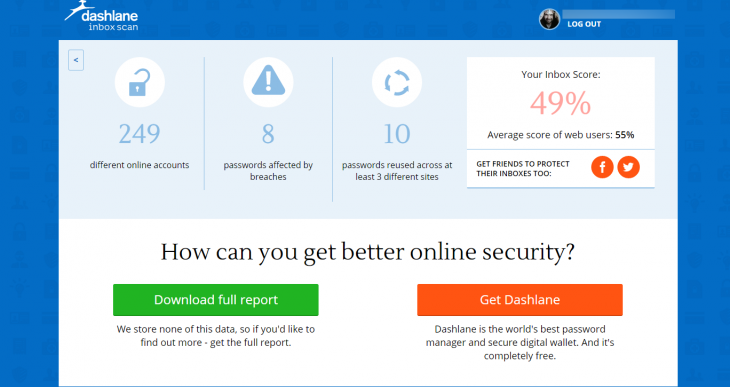
Dashlane launches online scanner that will identify potential vulnerabilities in your inbox


Dshlane has launched as online tool designed to make email inboxes more secure-and drive sign-ups to its password manager app, though no account is required to use the scanner service.

Receiving an email from a hacked account is a fairly common occurence for most people, which highlights just how much of a target they can be incredibly lucrative places for intruders that get past your password 


To help bring into focus exactly how much sensitive information and specifically, how many plain-text passwords-are sitting in your inbox, Dashline scanner gives you quick feedback about where you're most vulnerable.


You'll need to authorize the scanner for one-time access to your email accounts(Dashlane says no data or permissions are retained after your visit) and let it do its thing.


The first screen shows you all the services that you have information stored in your account for-the red bubbles indicate plain-text password stored in your inbox

The second screen provides a more detailed analysis that indicates your "favorite" password, how often certain passwords

have been reused and whether any breaches have been reported on specific sites, It also notifies you of  weak passwords and how many passwords you have stored in your account overall.


Clearly, in trying to get you to clean up your inbox and password best practices, Dashlane is hoping you'll click through and sign-up for its paid password manager software, but there's no obligation and no cost for using the scan.

The one potential oversight in the scanner is that if you want a full report, you can download it in PDF form, which list all the passwords found in plain text. If you lose the device you download the report on, there's no need to break into your email to get them. Best to digitally shred them once you're done

Monday, April 6, 2015

Make your PC sleep

Hibernate

This option was designed for laptops and might not be available for all PCs (PCs with InstantGo don't have the hibernate option). Hibernate uses less power than sleep and when you start up the PC again, you’re back to where you left off (though not as fast as sleep). Use hibernation when you know that you won't use your laptop or tablet for an extended period and won't have an opportunity to charge the battery during that time. First check to see if this option is available on your PC and if it is, turn it on.

Hibernate your PC

  1. Open Power Options by swiping in from the right edge of the screen, tapping Search (or if you're using a mouse, pointing to the upper-right corner of the screen, moving the mouse pointer down, and then clicking Search), enteringPower options in the search box, and tapping or clicking Power options.
  2. Tap or click Choose what the power button does and under Shutdown settings, select Hibernate (if it's available).
Now you'll see hibernate in these two places:
  • In the Power menu in the Settings charm.
  • In the Shut down menu.
    To get here, move the mouse to the lower left-hand corner of the screen and right-click or press Start button, or on your keyboard, press the Windows logo key Windows logo key+X.

Note
If devices connected to your PC (like monitor,printers, or scanners) aren’t working properly after waking up from sleep or hibernate, you might to disconnect and reconnect your devices or restart your PC,
You should also make sure that you have the most current drivers for all devices. For more info, check out how to Download and install drivers