Tuesday, February 2, 2016

Google Map Marker ID

Get Google Map Marker ID when we click on it

When we use Google Map in our web pages, we will have to think about getting the Google map marker ID, when it is clicked. Google Map marker ID is required for displaying some data which is associated with the Pin or marker on google map. Or we use the google map marker ID for storing the latitude and and longitude with the marker ID. On google map, each pin has got a unique id. So if you click on different markers, you will be getting different IDs. Here I am going to show an example for adding IDs to the markers on the Google Map and getting/alerting the ID of the clicked marker.


HTML For showing Google Map Markers

<!DOCTYPE html>
<html>
<head>
<meta charset="utf-8">
<title>Google Map</title>
<script type="text/javascript" src="http://maps.googleapis.com/maps/api/js?libraries=places&sensor=false"></script>
<style type="text/css">
.google-map {
width: 60%;
height: 500px;
margin: 0 auto;
border: 1px solid #c5c5c5;
}
</style>
</head>
<body>
<div class="google-map" id="map-canvas"></div>
</body>
</html>
Here, we are loading the map inside id=”map-canvas” div. In order to load Google map, we have to add Google map API url in the head tag of the HTML page.

Javascript For Google Map

<!--Script for google map-->
<script type="text/javascript">
function initialize_list() {
var latlng = new google.maps.LatLng(33.22949814144931,-99.82177934375);
var myOptions = {
zoom: 5,
center: latlng
};

var map = new google.maps.Map(document.getElementById('map-canvas'), myOptions);

var hotels = [
['Hotel 1, Place Name1, City1, State1', 33.22949814144931,-99.82177934375, 4, 1],
['Hotel 2, Place Name2, City2, State2', 33.376412351246586,-96.78955278125, 3, 2],
['Hotel 3, Place Name3, City3, State3', 35.08395557927625,-93.84521684375, 2, 3],
['Hotel 4, Place Name4, City4, State4', 37.631634755806274,-105.31494340625, 1, 4]
];

for (var i = 0; i < hotels.length; i++) {
var marker = new google.maps.Marker({
position: new google.maps.LatLng(hotels[i][1], hotels[i][2]),
map: map,
id: hotels[i][4], //we are adding IDs to the marker here
title: hotels[i][0]
});

google.maps.event.addListener(marker, "click", function() {
var marker = this;
alert('ID is :'+ this.id);
});
}
}

window.onload = initialize_list;
</script>
We are storing the details of the hotel, including the latitude and longitude values of the place in the ‘hotels’ array. And we set the latitude and longitude for the initial display of the map.
Here using ‘id’ we are assigning ID value to the marked. And on the click event or when we click on the marker, we will alert the clicked markers ID.

CSS3 3D Animation

The introduction of CSS 3 has changed the over all look and feel of the websites. CSS3 animations; transitions and transforms are the most interesting things in CSS3 ie. CSS3 3D animation . CSS transforms allows elements styled with CSS to be transformed in two-dimensional or three-dimensional space. No javascrip, no flash is required for creating 3D animations. It works well in latest browsers and just fine in less capable browsers.


CSS3 3D animation Explained

While we do CSS3 3D animation, we have to know two properties in CSS 3D transforms. One is “Perspective”. To activate 3D space, an element needs perspective. This can be applied with transform property, with the perspective as a functional notation
transform: perspective
Second thing is 3D transform functions. 3D transform uses the same transform propety used for 2D transforms.

CSS3 3D animation Example

Here I am going to give an example of 3D animation using a Mobile. When we hover the phone image it rotates and we are able to see the other side of the mobile.

HTML required for CSS3 3D animation

<div class="container">
<div class="mobile-front"></div>
<div class="mobile-back"></div>
</div>

CSS required CSS3 3D animation Example

/*Adding a container for the animation*/
.container{
 perspective: 800px;
 -webkit-perspective: 800px;
 width:500px;
 height:500px;
 margin:0 auto;
 border-radius:6px;
 position:relative;
 background: #1e5799;
 background: -moz-linear-gradient(top, #1e5799 0%, #2989d8 81%, #7db9e8 83%, #3297e5 100%);
 background: -webkit-gradient(linear, left top, left bottom, color-stop(0%,#1e5799), color-stop(81%,#2989d8), color-stop(83%,#7db9e8), color-stop(100%,#3297e5));
 background: -webkit-linear-gradient(top, #1e5799 0%,#2989d8 81%,#7db9e8 83%,#3297e5 100%);
 background: -o-linear-gradient(top, #1e5799 0%,#2989d8 81%,#7db9e8 83%,#3297e5 100%);
 background: -ms-linear-gradient(top, #1e5799 0%,#2989d8 81%,#7db9e8 83%,#3297e5 100%);
 background: linear-gradient(to bottom, #1e5799 0%,#2989d8 81%,#7db9e8 83%,#3297e5 100%);
}
.mobile-front,
.mobile-back{
        transform-style: preserve-3d; /* Enabling 3D transforms */
 -webkit-transform-style: preserve-3d;
 backface-visibility: hidden;
 -webkit-backface-visibility: hidden;
        width:255px;
 height: 470px;
        position:absolute;
 top:50%;
 left:50%;
 margin:-235px 0 0 -120px;
        background:url(mobile1.png) no-repeat left center;
 transition:0.8s;
}
.mobile-back{
 transform:rotateY(180deg);
 -webkit-transform:rotateY(180deg);
        background-position:right center;
}
.container:hover .mobile-front{
 transform:rotateY(180deg);
 -webkit-transform:rotateY(180deg);
}

.container:hover .mobile-back{
 transform:rotateY(360deg);
 -webkit-transform:rotateY(360deg);
}

CSS for CSS3 3D animation Explained

In the first place, we are enabling the 3D transforms. We are using two DIVs for the two sides of the mobile. And by using backface-visibility: hidden, we are hiding the DIVs when they are flipped. We animate the transitions with transition: 0.8s. With the class ‘mobile-back’, we are flipping the DIV which contains the other side of the mobile, to 180 degree as its default state. When we hover the container, we’ll flip the front side and hide the DIV and at the same time, we’ll flip the second container with the back side of the mobile.

Thursday, January 28, 2016

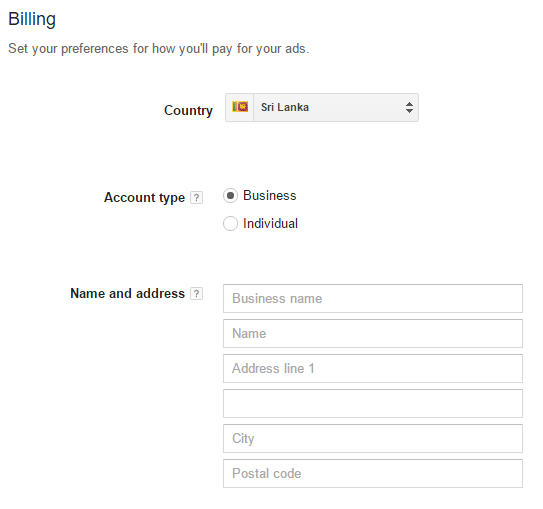
Google moving its Services into not free

Google has moved his services into payable yes the Google’s famous free services is known as Google AdWords Services has been used all the times as free for online marketing. Today  suddenly Google changed its policy,  it’s  really  frustration the people who are doing Online Market Research, Search Engine Optimization (SEO).


So when you are creating Google AdWords account anymore the process is going to be tuff basically the tool Google AdWords used to find best competitive keywords for targeting a significant words and the  location in the world  for an example if you a product owner you wanted to sell your product in online so obviously you need consultant who can do SEO, SEM, at all the time.


The consultant will understand your domain of the product, according to that he will be started to keyword Researching so he use almost Google AdWords also other tools are available when the product company’s point of view they need to create a campaign according to their product while the SEO Analyst creating, AdWords account on behalf of the Production company.


With regarding to new tweak the client have to pay for their ads anymore if you already have account on AdWords you were lucky and will not be struggle any issues with related payments 


Admin


JavaScript Scientific Calculator with Well-designed User Interface

In this tutorial shows how to create a simple JavaScript Scientific Calculator just in single HTML page with well-designed User Interface just try it your self  

File Name: Index.html


<!DOCTYPE html>
<html>
<head>
<style>
form{
width:440px;
padding:25px;
margin:auto;
border:5px solid #aaa;
border-radius:15px 15px;
}

input{
background:#888;
color:#fff;
font-size:15px;
padding-top:15px;
padding-bottom:15px;
padding-left:19px;
padding-right:19px;
margin:6px;
}

h2{
text-align:center;
}

.sc{
background:#fff;
color:#000;
}
</style>
<script>
function addChar(input, character) {
if(input.value == null || input.value == "0")
input.value = character
else
input.value += character
}

function cos(form) {
form.display.value = Math.cos(form.display.value);
}

function sin(form) {
form.display.value = Math.sin(form.display.value);
}

function tan(form) {
form.display.value = Math.tan(form.display.value);
}

function sqrt(form) {
form.display.value = Math.sqrt(form.display.value);
}

function ln(form) {
form.display.value = Math.log(form.display.value);
}

function exp(form) {
form.display.value = Math.exp(form.display.value);
}

function deleteChar(input) {
input.value = input.value.substring(0, input.value.length - 1)
}

function changeSign(input) {
if(input.value.substring(0, 1) == "-")
input.value = input.value.substring(1, input.value.length)
else
input.value = "-" + input.value
}

function compute(form) {
form.display.value = eval(form.display.value)
}

function square(form) {
form.display.value = eval(form.display.value) * eval(form.display.value)
}

function checkNum(str) {
for (var i = 0; i < str.length; i++) {
var ch = str.substring(i, i+1)
if (ch < "0" || ch > "9") {
if (ch != "/" && ch != "*" && ch != "+" && ch != "-" && ch != "."
&& ch != "(" && ch!= ")") {
alert("invalid entry!")
return false
}
}
}
return true
}
</script>
</head>
<body>
<br>
<form name="sci-calc">
<h2>SCIENTIFIC CALCULATOR</h2>
<table cellspacing="0" cellpadding="1">
<TR>
<TD COLSPAN="5" ALIGN="center"><input NAME="display" class="sc" VALUE="0" SIZE="44" MAXLENGTH="25"></TD>
</TR>
<TR>                                
<td align="center"><input type="button" value="Clear" ONCLICK="this.form.display.value = 0 "></TD>
<td align="center" colspan="2"><input type="button" value="      Backspace     " ONCLICK="deleteChar(this.form.display)"></TD>
<td align="center" colspan="2"><input type="button" value="           Enter          " NAME="Enter" ONCLICK="if (checkNum(this.form.display.value)) { compute(this.form) }"></TD>
</TR>
<TR>
<td align="center"><input type="button" value=" exp " ONCLICK="if (checkNum(this.form.display.value)) { exp(this.form) }"></TD>
<td align="center"><input type="button" value="  7  " ONCLICK="addChar(this.form.display, '7')"></TD>
<td align="center"><input type="button" value="  8  " ONCLICK="addChar(this.form.display, '8')"></TD>
<td align="center"><input type="button" value="  9  " ONCLICK="addChar(this.form.display, '9')"></TD>
<td align="center"><input type="button" value="   /   " ONCLICK="addChar(this.form.display, '/')"></TD>
</TR>                                
<TR>                                
<td align="center"><input type="button" value="  ln   " ONCLICK="if (checkNum(this.form.display.value)) { ln(this.form) }"></TD>
<td align="center"><input type="button" value="  4  " ONCLICK="addChar(this.form.display, '4')"></TD>
<td align="center"><input type="button" value="  5  " ONCLICK="addChar(this.form.display, '5')"></TD>
<td align="center"><input type="button" value="  6  " ONCLICK="addChar(this.form.display, '6')"></TD>
<td align="center"><input type="button" value="   *   " ONCLICK="addChar(this.form.display, '*')"></TD>
</TR>                                
<TR>                                  
<td align="center"><input type="button" value=" sqrt " ONCLICK="if (checkNum(this.form.display.value)) { sqrt(this.form) }"></TD>
<td align="center"><input type="button" value="  1  " ONCLICK="addChar(this.form.display, '1')"></TD>
<td align="center"><input type="button" value="  2  " ONCLICK="addChar(this.form.display, '2')"></TD>
<td align="center"><input type="button" value="  3  " ONCLICK="addChar(this.form.display, '3')"></TD>
<td align="center"><input type="button" value="   -   " ONCLICK="addChar(this.form.display, '-')"></TD>
</TR>                                
<TR>                                
<td align="center"><input type="button" value="  sq  " ONCLICK="if (checkNum(this.form.display.value)) { square(this.form) }"></TD>
<td align="center"><input type="button" value="  0  " ONCLICK="addChar(this.form.display, '0')"></TD>
<td align="center"><input type="button" value="   .  " ONCLICK="addChar(this.form.display, '.')"></TD>
<td align="center"><input type="button" value=" +/- " ONCLICK="changeSign(this.form.display)"></TD>
<td align="center"><input type="button" value="   +  " ONCLICK="addChar(this.form.display, '+')"></TD>
</TR>                                
<TR>                                
<td align="center"><input type="button" value="   (    " ONCLICK="addChar(this.form.display, '(')"></TD>
<td align="center"><input type="button" value="cos" ONCLICK="if (checkNum(this.form.display.value)) { cos(this.form) }"></TD>
<td align="center"><input type="button" value=" sin " ONCLICK="if (checkNum(this.form.display.value)) { sin(this.form) }"></TD>
<td align="center"><input type="button" value=" tan" ONCLICK="if (checkNum(this.form.display.value)) { tan(this.form) }"></TD>
<td align="center"><input type="button" value="   )   " ONCLICK="addChar(this.form.display, ')')"></TD>
</TR>                              

</table>
</form>
</body>
</html>

How to set Password for Google

In this tutorial we are going to learn how to disable text box in 3 failure login attempts. The user is only given 3 chances to enter the correct username and password. Once is correct it will redirect to google index page
Username: test
Password: test
You can modify the username and password inside the script.
You need internet connection for this


<!DOCTYPE html>
<html>
<head>
<style>
table{ 
      margin:auto;
    }
input{
      border:1px solid #888;
      padding:5px;
    }
</style>
</head>
<body>
<script type = "text/javascript">

var count = 2;
function validate() {
var un = document.myform.username.value;
var pw = document.myform.pword.value;
var valid = false;

var unArray = ["admin", "test", "sample"];  
var pwArray = ["admin", "test", "sample"]; 

for (var i=0; i <unArray.length; i++) {
if ((un == unArray[i]) && (pw == pwArray[i])) {
valid = true;
break;
}
}

if (valid) {
alert ("Login Successfully!");
window.location = "http://www.google.com";
return false;
}

var t = " tries";
if (count == 1) {t = " try"}

if (count >= 1) {
alert ("Invalid Username or Password.  You have " + count + t + " left.");
document.myform.username.value = "";
document.myform.pword.value = "";
setTimeout("document.myform.username.focus()", 25);
setTimeout("document.myform.username.select()", 25);
count --;
}

else {
alert ("Still incorrect! You have no more tries left!");
document.myform.username.value = "No more tries allowed!";
document.myform.pword.value = "";
document.myform.username.disabled = true;
document.myform.pword.disabled = true;
return false;
}

}

</script>
<br><br><br><br>
<br><br><br><br>
<br><br>
<table cellpadding="5">
<form name = "myform">
<tr>
<td><label>Username: </label></td><td> <input type="text" name="username"></td>
</tr>
<tr>
<td><label>Password: </label></td><td> <input type="password" name="pword"></td>
</tr>
<tr>
<td></td><td><input type="button" value="Log In" name="Submit" onclick= "validate()"></td>
</tr>
</form>
</table>
</body>

</html>


Monday, January 18, 2016

Google Hummingbird Update and How It Affects SEO


by Kerry Butters • SEO 
It’s been a busy few years for the engineers at Google; not only have we had the much-discussed Penguin and Panda updates, but last year brought us the biggest update we’ve seen since 2001. So what does Hummingbird mean to SEO? Why did it come about and is it likely to hit your site as hard as the Penguin/Panda updates did.

It’s pretty safe to say that if you haven’t been affected by the update already, then you can breathe easily, so long as you stick to the rules. Hummingbird was released very quietly in August 2013 and most site owners didn’t notice a difference.


What Hummingbird is all About

Whilst Panda and Penguin were changes to a part of the old algorithm, Hummingbird is the new algorithm, which is made up of more than 200 factors that can affect ranking and search. The biggest changes were made with a sharp eye on mobile and that’s not surprising given the explosion of the mobile market in recent years.
This brought about ‘conversational search’ being added to the Hummingbird algorithm, which is designed to focus on the meaning of a phrase, rather than individual keywords. This is because many people now use voice when searching on mobile, rather than typing – let’s face it, it’s a lot easier to say something than to type on a soft keyboard.
So instead of working in such a way that looks for individual words, Hummingbird works in such a way that it can better understand a question, such as “where can I find a chemist in Birmingham”. It looks for the meaning behind the words, rather than just at the words themselves and it looks at the entire phrase to decipher that meaning.


What does it mean for SEO?

Not much really, unless you’re bending or breaking the rules, a white hat approach will mean that SEO shouldn’t be affected. Despite the tired old cries of “SEO is Dead!” doing the usual rounds online, if you’re a publisher of quality content then Hummingbird will make no difference. For SEO professionals, it’s actually a good thing as it helps to weed out the black hats that make outrageous (and unfounded) claims that they can get your site on page one of Google search results within a week.
For content publishers and writers, Hummingbird is also a good thing, so long as the content being produced is worthwhile. The algorithm is intended to help get rid of irrelevant content and spam and put more weight on industry thought leaders and influencers.
The authorship program goes hand-in-hand with this as it allows Google to find authors that produce high-quality content and rely on them to be ‘trusted’ authors.
Link building practices are also affected, as the algorithm seeks to find dodgy practices (such as poor quality guest blogging) by evaluating inbound links in a more complex manner.


Why Bring in Hummingbird

Aside from making search more intuitive and developing its Knowledge Graph further, Google is attempting to make the web a better, more useful place. Slowly but surely, content mills, link wheels and similar black hat search-enhancing tactics are going away. For those of us that remember the days when a search often brought back results that took you to a page full of useless links, this is a big step in the direction of making the net what it was – somewhere you could do a little research and find out all kinds of fantastic facts without having to dig your way through a pile full of dross first.
Of course, this has been happening for a few years now, Hummingbird isn’t an instant fix of all the things that have been wrong, it’s been slowly taking place for ages.
Take a look at the image above from Google and you can see that this has been an evolving process for many years – even voice search was introduced in late 2008, it’s not a new idea that’s been plonked into Hummingbird.


Long-tail Keywords

As Hummingbird uses phrases, rather than keywords, the use of long-tail keywords are likely to become more important than ever in SEO. ‘How to’ content is also very valuable if you consider how many people across the world may use the phrase “How can I learn” or similar.
Long-tail keywords are basically a phrase which are generally used for content in order to get picked up in search and this also isn’t a new practice.

Again, it’s all about the phrases, so if you have a site that sells your services as a Spanish teacher for example, you would have various phrases littered around the site such as ‘learn how to speak Spanish’ and ‘experienced Spanish teacher’ rather than just having ‘speak Spanish’ or ‘learn Spanish’ stuffed into as many places as possible.
Hummingbird is more intelligent than the last algorithm engine, so it recognises keyword stuffing and issues penalties accordingly.
Take a look at the ‘periodic table below from searchengineland for a great overview of ‘SEO Success Factors’ and how many factors make up great SEO. You’ll find that Hummingbird and all of it parts is made up of many, many things that can affect ranking.


All of these work together in order to return the best possible results to the person doing the searching and if you can get the balance right, you’re in business. It’s not easy to compete online, but Hummingbird is intended to make sure that those who do it right get their rewards. That means that for any site owner, looking at the bigger picture is necessary. It’s no longer enough to have the office junior slap up the odd, badly-written blog anymore – if you want decent content then you have to pay for it.

It’s also not enough to tinker with the SEO yourself or allow someone making grandiose claims to do it for you. Today’s site owners, content producers, SEO professionals and publishers have to concentrate on one thing – quality and integrity in everything that they do online.

Friday, January 8, 2016

Implementation of Polymorphism


Polymorphism is derived from two Greek words. Poly (meaning many) and morph (meaning forms). Polymorphism means many forms. In C you have two methods with the same name that have different function signatures and hence by passing the correct function signature you can invoke the correct method.

This is how polymorphism is achieved in languages like C where in a function sum(int, int) differs from sum(float, float). Therefore the method sum() has many forms depending on the parameters being passed to it.

The meaning with Object Oriented languages changes. With Object Oriented language polymorphism happens:

When the decision to invoke a function call is made by inspecting the object at runtime it is called Polymorphism


PHP 5 Polymorphism


Since PHP 5 introduces the concept of Type Hinting, polymorphism is possible with class methods. The basis of polymorphism is Inheritance and overridden methods.

Lets look at an example:
 
class BaseClass {
   public function myMethod() 
    {
      echo "BaseClass method called";
    }
}
 
class DerivedClass extends BaseClass 
    {
   public function myMethod() {
      echo "DerivedClass method called";
    }
}
 
function processClass(BaseClass $a) {
   $a->myMethod();
}
 
$a = new DerivedClass();
processClass($a);


In this code object $a of class DerievedClass is executed and passed to the processClass() method. The parameter accepted in processClass() is that of BaseClass, within in processClass() the method myMethod() is being called Since the method is being called on the class variable of BaseClass.