Tuesday, April 7, 2015

Dashlane launches online scanner that will identify potential vulnerabilities in your inbox


Dshlane has launched as online tool designed to make email inboxes more secure-and drive sign-ups to its password manager app, though no account is required to use the scanner service.

Receiving an email from a hacked account is a fairly common occurence for most people, which highlights just how much of a target they can be incredibly lucrative places for intruders that get past your password 


To help bring into focus exactly how much sensitive information and specifically, how many plain-text passwords-are sitting in your inbox, Dashline scanner gives you quick feedback about where you're most vulnerable.


You'll need to authorize the scanner for one-time access to your email accounts(Dashlane says no data or permissions are retained after your visit) and let it do its thing.


The first screen shows you all the services that you have information stored in your account for-the red bubbles indicate plain-text password stored in your inbox

The second screen provides a more detailed analysis that indicates your "favorite" password, how often certain passwords

have been reused and whether any breaches have been reported on specific sites, It also notifies you of  weak passwords and how many passwords you have stored in your account overall.
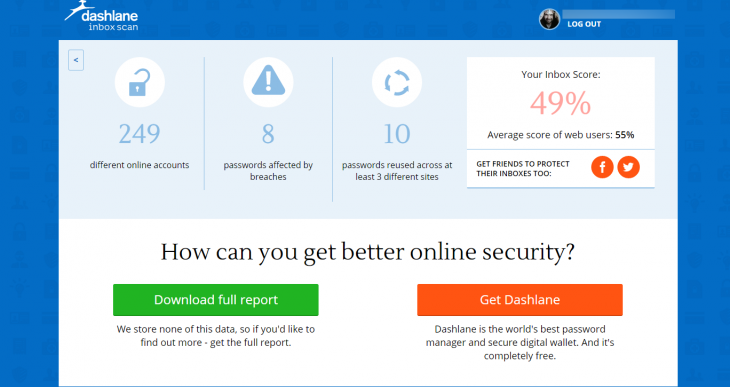

Clearly, in trying to get you to clean up your inbox and password best practices, Dashlane is hoping you'll click through and sign-up for its paid password manager software, but there's no obligation and no cost for using the scan.

The one potential oversight in the scanner is that if you want a full report, you can download it in PDF form, which list all the passwords found in plain text. If you lose the device you download the report on, there's no need to break into your email to get them. Best to digitally shred them once you're done

Monday, April 6, 2015

Make your PC sleep

Hibernate

This option was designed for laptops and might not be available for all PCs (PCs with InstantGo don't have the hibernate option). Hibernate uses less power than sleep and when you start up the PC again, you’re back to where you left off (though not as fast as sleep). Use hibernation when you know that you won't use your laptop or tablet for an extended period and won't have an opportunity to charge the battery during that time. First check to see if this option is available on your PC and if it is, turn it on.

Hibernate your PC

  1. Open Power Options by swiping in from the right edge of the screen, tapping Search (or if you're using a mouse, pointing to the upper-right corner of the screen, moving the mouse pointer down, and then clicking Search), enteringPower options in the search box, and tapping or clicking Power options.
  2. Tap or click Choose what the power button does and under Shutdown settings, select Hibernate (if it's available).
Now you'll see hibernate in these two places:
  • In the Power menu in the Settings charm.
  • In the Shut down menu.
    To get here, move the mouse to the lower left-hand corner of the screen and right-click or press Start button, or on your keyboard, press the Windows logo key Windows logo key+X.

Note
If devices connected to your PC (like monitor,printers, or scanners) aren’t working properly after waking up from sleep or hibernate, you might to disconnect and reconnect your devices or restart your PC,
You should also make sure that you have the most current drivers for all devices. For more info, check out how to Download and install drivers

Friday, March 27, 2015

Remember Super Mario 64? You can now play an HD recreation in your browser

Remember Super to Mario 64? well you should it's arguably the greatest platformer since video games began letting you move through more than two demention.

We don't all have a Nintendo 64 you can play the game in your browser using  a Unit Plug-in, and it runs fairly smoothly on my surface W8.1. The level layout and physics are virtually identical, and you can control Mario with either your keyboard

If you'd rather to take the game around with you, you can also download it on Windows, Mac or Linux.


Check it out, it's impressive work.


YouTube is testing smooth 60fps video streaming in ultra high-def 4K resolution

YouTube announced support for smooth 60 frames per second (fps) video playback last October. Now, techcrunch reports that the streaming platform is experimenting with high frame rate 4K video.

The effect is nothing short of running. In addition to sharper video, movement appears far smoother that at more common frame rates of 24fps and 30fps, Play either video below, click the gear icon and choose the high-resolution, high frame rate stream option.


Thursday, March 26, 2015

Wednesday, March 25, 2015

Monday, March 9, 2015

Cloud Computing Explained

A Convergence of Technologies

Cloud Computing came about with the convergence of technologies. Of course, you need hardware. Relatively inexpensive servers and storage makes data centers possible. Increased availability of high-speed Internet connections means these data centers can be located where it is most economical.
Of course, a data center alone does not constiture Cloud Computing. Cloud Computing is realized through the Cloud Computing Stack. The Cloud Computing Stack organizes the hardware/software of a data center into various service layers. These layers are organized into Cloud Computing Categories.


Virtual machines/servers can be specified in the Cloud. A given Cloud may contain multiple servers/machines supporting various software/services. Connections to these services are made using Web Services that are the basis of application program interfaces (APIs) commonly used in Cloud Computing.


     For figures on this website, the following is notation used.


Any Organization Can Use Cloud Computing

Payment for Cloud Computing services is usually on some incremental basis. In other words, you pay for only what you use. This works for organization of most any size. It is possible that for smaller organization, Cloud Computing will allow the use of software that would normally be prohibitively expensive if the organization had to buy it and install it on their own server. For very small organizations, it might be possible to find Cloud Computing services that are free for low levels of usage.

Blurring of Services

It is possible to assemble a service-oriented architecture (SOA) that uses services from multiple Cloud providers along with services provided by systems internal to an organization. This results in a blurring of where the services actually reside. In fact, most often it does not matter where they reside for functionality. Location of services are often dictated governance issues such legal or security concerns, as opposed to technical issues.